


 Mathan Allington

SCORM vs xAPI explained for HR teams 2026
 Compono
Confused about e-learning standards? SCORM vs xAPI explained for HR teams, when to use each format, and what each means for your learning data.

The best Coassemble alternatives in 2026 range from simple course authoring tools for small businesses to comprehensive learning management systems that connect training directly to workplace competency.
Last reviewed November 2026
Quick answer
- Price: From free starter plans up to enterprise custom pricing.
- Best for: Mid-market teams needing SCORM support, deep compliance tracking and actual capability assurance.
- Verdict: Choose a lightweight alternative if you only need rapid course creation, but move to a capability-driven platform if you need to prove your workforce can perform the job.
Coassemble is a brilliant authoring tool for getting simple content out the door. It allows trainers to build engaging, interactive slides without needing a degree in instructional design. However, as organisations scale past their startup phase, the requirements shift from simple knowledge sharing to rigorous compliance and capability tracking. Mid-market human resources teams often hit a wall when they need deep integrations or advanced reporting.
Process-heavy organisations need systems that speak to the rest of their technology stack. Coassemble natively integrates with only two products: Slack and Loom, according to a 2026 comparison published by Trainual. When you manage high-stakes compliance, multi-audience learning or complex competency frameworks, you need platforms that support SCORM, handle detailed data exports and prove actual workforce capability. You need to know that your talent management software manages both the process of delivering training and the human insight of whether that training actually worked.
Today, Coassemble alternatives span tools for SMB onboarding, branded course sales, collaborative authoring and enterprise multi-audience learning, according to a recent review by Teachfloor. Finding the right fit means understanding exactly what problem you need your new platform to solve.
We have evaluated the leading learning platforms available today. Here is how the top contenders stack up for mid-market buyers.
Most learning management systems only measure process risk. They record whether someone clicked through to the final slide and downloaded a certificate. Compono Develop measures people risk. It connects learning directly to your competency frameworks, ensuring that when an employee completes a module, they actually have the capability to perform the work safely and effectively.
This approach delivers tangible business outcomes. The platform boasts a 4.7 out of 5 rating across millions of learners. In high-stakes environments, the results speak for themselves. The engine powering Compono Assure and Develop helped the Department of Transport Victoria (formerly VicRoads) save $34M in operational costs over two years through digital licensing and reliable capability assessment. If you want Australian LMS software that treats learning as a strategic driver rather than a compliance checklist, Compono Develop gives you the complete picture.
Trainual focuses heavily on building out your company playbook. It provides an excellent environment for documenting the specific, repeatable tasks that make your business run. In fact, Trainual is rated the No. 1 Coassemble alternative by G2, according to Trainual's comparison page. It excels at onboarding new hires into company-specific workflows, though it may lack the depth required for complex, multi-layered regulatory compliance programs.
TalentLMS is a reliable, traditional platform that covers the fundamental requirements of a learning management system. It supports standard eLearning formats and offers a straightforward way to deploy off-the-shelf courses. The free tier makes it highly accessible for tiny startups, but growing teams often find the reporting interface lacks the nuance needed for strategic workforce planning.
360Learning turns your employees into course creators. It relies on a peer-to-peer model where subject matter experts share their knowledge directly with the team. This works beautifully for fast-moving product teams or sales departments. However, if your organisation relies entirely on external regulatory content, the collaborative features may go unused.
LearnWorlds is built for the creator economy and customer education. It offers superb video editing tools, marketing integrations and customisable storefronts. If your goal is to turn training into a revenue stream, LearnWorlds is a strong contender. For internal HR teams focused on workplace safety and culture, the e-commerce features add unnecessary complexity.
Docebo is an enterprise-grade powerhouse. It supports SCORM and xAPI, provides custom reporting and uses artificial intelligence to recommend content to learners. When comparing Docebo against simpler tools, the depth of its feature set is obvious. The trade-off is a steep learning curve and an implementation period that demands dedicated internal resources.
Understanding exactly what each platform delivers helps narrow down the shortlist. Use this matrix to compare the core capabilities of the top Coassemble alternatives.
| Platform | Starting price | Best for | SCORM / xAPI support |
|---|---|---|---|
| Compono Develop | Pricing on request | Capability assurance and compliance | Yes |
| Trainual | Pricing on request | Playbooks and process documentation | Limited |
| TalentLMS | $119 / month | Traditional LMS needs | Yes |
| 360Learning | $8 / user / month | Collaborative peer learning | Yes |
| LearnWorlds | $24 / month | Selling courses online | Yes |
| Docebo | Pricing on request | Enterprise AI curation | Yes |
Compono makes Compono Develop. We've included it and kept every entry's strengths and limits honest.
Moving away from a proprietary authoring tool requires careful planning. Content lock-in is a common frustration for teams transitioning to a new LMS. When you build content directly inside a closed set of tools, exporting those interactive modules into a universal format like SCORM or xAPI can create friction. A solid migration strategy protects your existing investment in training materials.
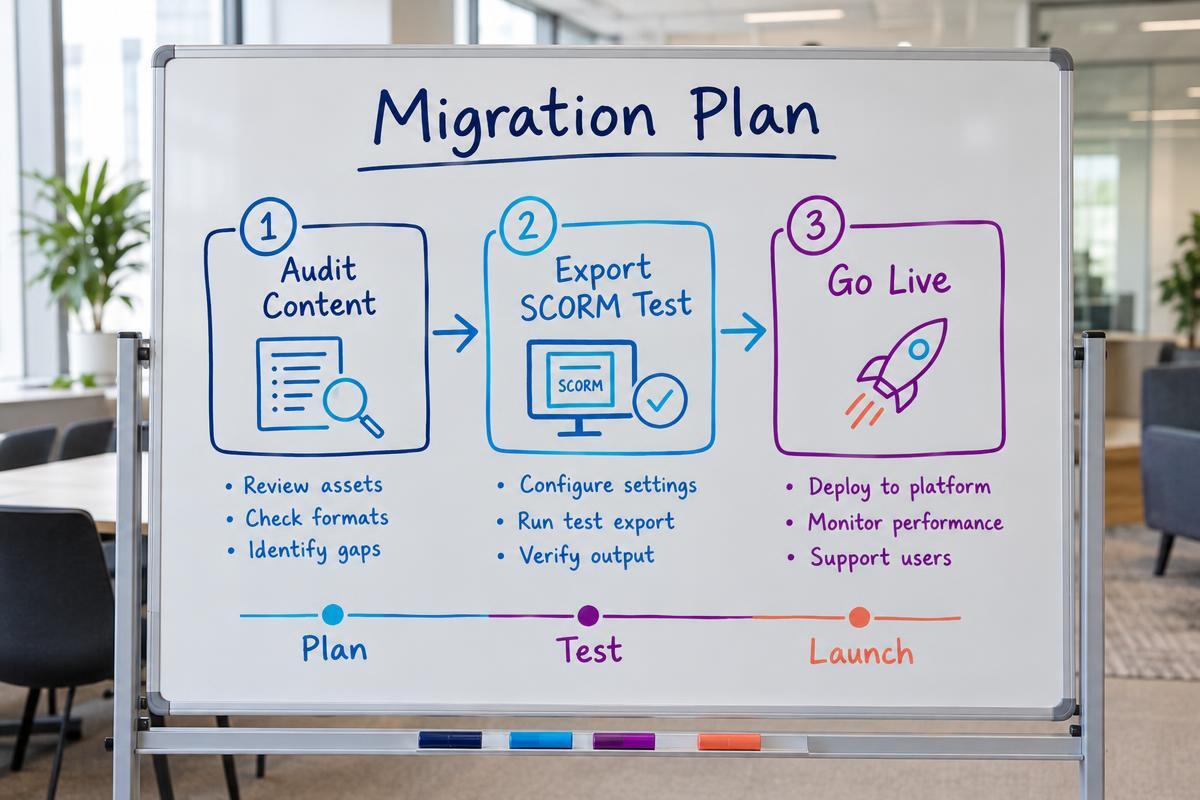
Start with a comprehensive content audit. Identify which courses are actively used and which are outdated. There is no value in migrating legacy content that no longer aligns with your company policies. Next, test the export capabilities of your current platform. Export a small, complex module and upload it to your trial environment in the new system. Check that the formatting holds up and that quiz scores report accurately back to the grade book.
Finally, consider the balance between AI generation and manual authoring in your new platform. Modern systems use AI to dramatically improve speed-to-publish metrics, helping teams spin up drafts in minutes. However, speed cannot replace valid assessment design. Your platform must allow instructional designers to review, edit and validate every AI-generated question to ensure it truly measures capability.
If you are tired of learning systems that only track completion rates without proving actual capability, we should talk. Compono Develop connects learning directly to your competency frameworks, ensuring your team has the skills they need to perform safely and effectively.
Coassemble allows you to export your data, but because it is primarily an authoring tool with proprietary interactive templates, moving those exact interactive slides into another system can be challenging. You often need to export the raw text and media assets, then rebuild the courses in your new SCORM-compliant platform.
Yes. While newer standards like xAPI offer richer data tracking, SCORM remains the universal language of the eLearning industry. Choosing a platform that supports SCORM ensures you can buy off-the-shelf compliance courses from third-party vendors and plug them straight into your system without expensive custom development.
An authoring tool is software used to design and build the actual training content, like slides, videos and quizzes. A learning management system (LMS) is the platform used to host, distribute and track that content across your workforce. Some platforms combine both functions, while others specialise in one area.
You have likely outgrown your current setup if you spend hours manually merging spreadsheets to prove compliance to auditors, if you cannot map training outcomes to specific job competencies, or if you need to integrate learning data securely with your central HR information system.

Confused about e-learning standards? SCORM vs xAPI explained for HR teams, when to use each format, and what each means for your learning data.
Compare the best iSpring Learn alternatives in 2026. Explore pricing, features and how to choose an LMS that builds real workforce capability. See...
Compare the best AG5 alternatives for 2026. Discover how top skills management platforms and LMS integrations help modern teams track and build...
 Mathan Allington