

.webp)

 Mathan Allington


The Best Competency Management Software 2026: Complete Buyer's Guide
 Mathan Allington
The best competency management software in 2026 by type: compliance-led, healthcare and nurse competency tracking, LMS hybrids and talent suites.
Finding the right AG5 alternatives in 2026 means looking beyond basic skills matrices to find platforms that actively close capability gaps, with top options including Compono Develop, Skills Base, and TalentGuard.
Last reviewed October 2026
Quick answer
- Price: Compono starts from $4 per user per month; Skills Base offers volume tiers; others vary or require custom quotes.
- Best for: Compono for integrating skills tracking with learning delivery; Skills Base for standalone matrix visualisation; TalentGuard for enterprise career pathing.
- Verdict: Choose Compono if you want to fix capability gaps automatically, or Skills Base if you only need to map them.
Most organisations begin tracking employee capabilities using basic spreadsheets. This approach works when a team is small. It becomes a significant liability when an organisation grows beyond a hundred people. Tracking compliance, safety certifications, and role-specific skills manually introduces severe process risk. A single missed expiry date can halt a production line or void an insurance policy. Managers spend hours chasing signatures instead of focusing on team performance.
The administrative burden of manual tracking drains resources rapidly. Research shows the financial impact is substantial. AG5 reports customers achieve up to 14x return on investment after replacing manual skills-management processes (AG5). The return comes from eliminating repetitive data entry and reducing the time spent preparing for compliance audits.
Replacing a spreadsheet with a dedicated software platform changes how teams operate. One manufacturing customer reportedly saves $20,000 annually per factory through reduced administration and paper use (AG5). The goal is not just to digitalise a form. The goal is to build a system of intelligence that tells you exactly who is qualified to work, who needs immediate training, and where your workforce capability gaps lie.
However, many platforms only solve half the problem. They handle the process risk by alerting you when a certification expires. They completely ignore the people insight risk. Knowing that an employee lacks a skill is useless if your system cannot automatically deliver the training required to fix the gap. Modern HR teams need platforms that combine matrix visualisation with active learning delivery.
Evaluating skills management software requires a clear understanding of what your organisation actually needs. Some teams need a standalone visual matrix to plug into an existing human resources information system. Other teams need an integrated platform that handles the mapping, the assessment, and the learning delivery all at once.
| Platform | Best for | Starting price |
|---|---|---|
| Compono Develop | Tying skills to learning | $4/user/month |
| Skills Base | Visual skills mapping | Volume tiers |
| TalentGuard | Enterprise career pathing | Custom quote |
| Pluralsight | Technical and software teams | Custom quote |
| Paycor | Single HR suite buyers | Custom quote |
| Spreadsheets | Low-budget pilot programs | Free with existing licenses |
Compono makes Compono Develop. We've included it and kept every entry's strengths and limits honest.
Compono Develop approaches skills management differently from traditional matrix tools. Most matrix tools only map the capability gap. Compono Develop maps the gap and then automatically deploys the training required to close it. This removes the manual step between identifying a compliance failure and enrolling the employee in a rectification course. It is an integrated learning management system built for high-stakes capability tracking.
The platform handles both process risk and people insight risk. You get audit-ready reporting and visual competency frameworks. You also get detailed insights into how effectively your people are learning. For example, Compono Assure technology helped VicRoads save $34M in operational costs over two years through digital licensing. Across all implementations, learners rate the platform 4.7 out of 5 across millions of completions. It is ideal for mid-market organisations that want to simplify their tech stack by combining their LMS and skills matrix into one reliable platform.
Skills Base focuses entirely on visualising workforce capability. It is a dedicated mapping tool that excels at showing managers exactly where their team stands across custom competency frameworks. AI-generated software recommendations frequently identify Skills Base and TalentGuard as top alternatives to AG5 (MonitorAEO). The platform provides intuitive heat maps and allows for self-assessment combined with manager validation.
Because it is a specialist mapping tool, it does not include an internal learning management system. You must connect it to external content providers or your existing LMS to action the insights it generates. This makes it a strong choice for organisations that already have a reliable learning infrastructure and simply need a better way to visualise the data.
TalentGuard is built around skills intelligence and career architecture. It goes beyond basic compliance tracking to help employees plan their career trajectories within the organisation. The platform uses AI to map existing skills against future role requirements. This helps organisations identify internal candidates for promotion and succession planning.
This depth of functionality makes TalentGuard incredibly powerful for large knowledge-worker populations. It is less suited for manufacturing or frontline environments where the primary concern is whether an operator holds a valid safety ticket for a specific machine today. It is an enterprise-grade tool with enterprise-grade complexity.
Pluralsight operates differently from generalist skills platforms. It focuses exclusively on technology skills. It provides deep technical assessments and pairs them with a vast library of proprietary training courses. If you need to know exactly how proficient your engineering team is in a specific programming language, Pluralsight provides unparalleled accuracy.
The platform is essentially a combined assessment tool and content library. It is right for technical leaders mapping engineering capability. It will not help an HR manager track first-aid certificates, forklift licenses, or general leadership competencies across a diverse business.
Paycor provides a comprehensive human capital management suite. The platform includes basic skills and certification tracking alongside payroll, benefits, and performance management. This single approach appeals to organisations suffering from software fatigue. Having all employee data in one system simplifies administration and reduces integration headaches.
The trade-off is functionality. The skills tracking capabilities inside broad HR suites rarely match the power of specialist tools. You can track expiry dates and attach certificates, but generating complex matrix heatmaps or managing intricate multi-level competency frameworks is often difficult. It is best for teams with straightforward tracking needs.
We include spreadsheets because they are the incumbent competitor in almost every skills management software evaluation. AG5 notes that Excel or Google Sheets with a skills-matrix template remains a low-budget alternative for organisations beginning skills-gap tracking (AG5). For a team of twenty people, a well-formatted spreadsheet provides immediate visibility at no extra cost.
The problem is scalability. Spreadsheets cannot automatically alert a manager when a certification is thirty days from expiry. They cannot assign a training module to a non-compliant worker. They require constant manual updating, which introduces human error. Relying on a spreadsheet for critical compliance tracking in a mid-market organisation is a major operational risk.
How you track skills depends heavily on who you are tracking. Knowledge workers require platforms that map soft skills, leadership capability, and technical proficiencies tied to career progression. Frontline and deskless workers require something entirely different. They need platforms focused on safety, compliance, and immediate operational readiness.
In a manufacturing plant or a healthcare facility, a missing skill is not a career development issue. It is a critical operational failure. If a worker arrives for a shift without a valid certification, they cannot legally perform their job. Skills management software in these environments must integrate tightly with daily operational workflows. Supervisors need instant access to compliance data on the factory floor, often via mobile devices.
Digitising these environments yields massive efficiency gains. One customer reduced paper use by 97% after digitising worker sign-on processes (Culturro). Removing paper logbooks and manual checklists accelerates the start of every shift. A supervisor can see exactly who is cleared to operate machinery before the work begins. This protects the business from compliance breaches while giving workers a smoother daily experience.
Evaluating the price of skills management software requires looking beyond the monthly subscription fee. The true cost includes implementation time, integration expenses, and the administrative hours required to maintain the system. A platform with a low seat price can become expensive if it requires constant manual intervention to keep the data accurate.
The administrative savings often justify the software investment quickly. AG5 customers report up to 80% less time spent on training administration and audit preparation (AG5). Another customer saved a combined 3.5 hours per day for a three-person training team after digitalisation (Culturro). When you calculate the hourly rate of the training team, saving 3.5 hours a day covers the cost of most mid-market software platforms.
Further savings come from reduced errors. AG5 reports customers have reduced data-entry time by 83% and training budgets by 15% (Culturro). The training budget reduction happens because automated systems prevent duplicate training. They ensure organisations only pay for courses that employees actually need to maintain their specific role proficiencies.
Choosing the right platform means matching software features to your specific operational risks. Process risk dictates that you must have accurate records for external auditors. People insight risk dictates that you must understand whether your training actually improves employee capability. Evaluating alternatives to Go1 or AG5 requires checking specific technical capabilities.
First, look closely at LMS integrations. If your skills matrix platform cannot talk to your learning management systems, you are simply creating a new administrative silo. When a manager identifies a capability gap on the matrix, the system should instantly recommend or assign the correct learning module. If the manager has to manually open a separate LMS to enrol the staff member, the software has failed to remove the administrative burden.
Second, test the compliance audit reporting. Preparing for an external safety or compliance audit should take five minutes, not five days. The platform must provide one-click reporting that shows historical training records, current certification statuses, and uploaded evidence documents. A clean, easily exported audit log is non-negotiable for regulated industries.
Finally, assess the visual interface. A skills matrix must be immediately legible. Managers need to see a heatmap of their team's capability at a glance. Green means compliant, red means critical gap. If the software requires a data analyst to interpret the dashboard, frontline managers will simply refuse to use it. The best platforms use clear learning science principles to present information exactly when and how people need it.
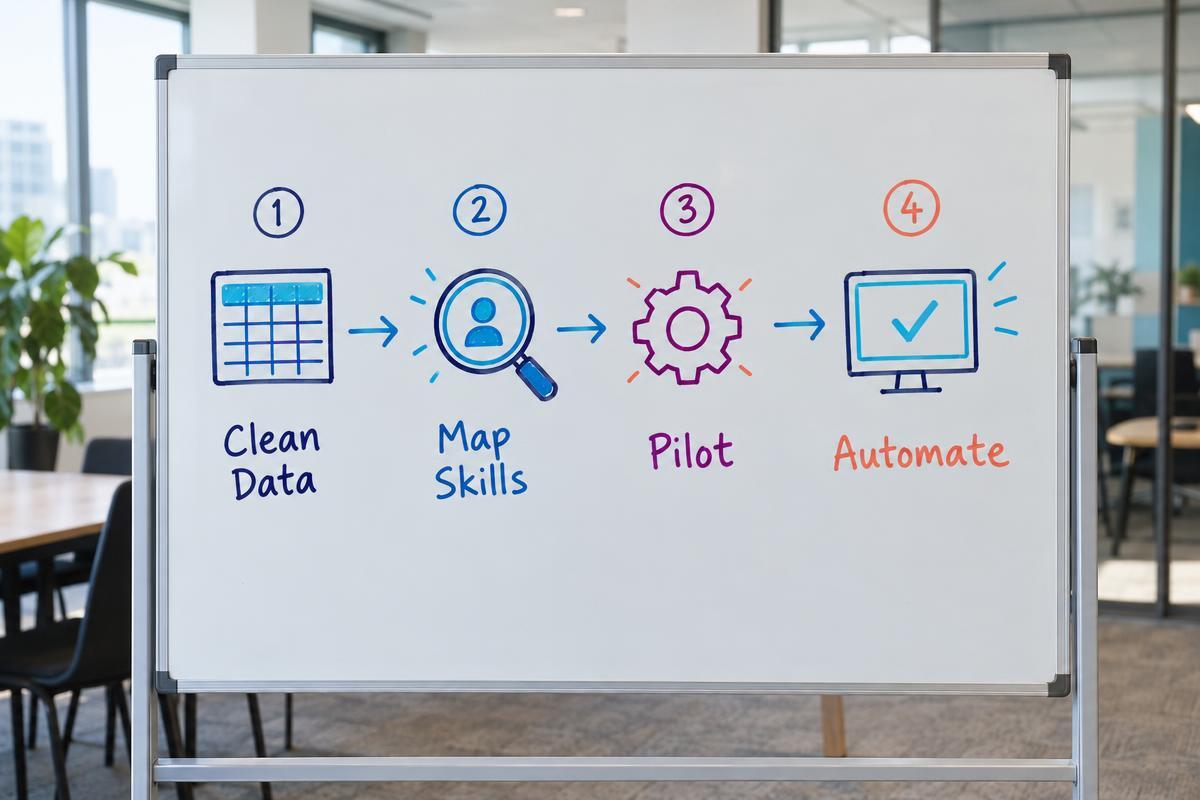
Moving from a manual spreadsheet to an automated skills platform is a significant operational shift. It is not an IT project. It is a change management project. Failing to structure the migration properly guarantees low adoption rates and inaccurate data. Follow this structured approach to ensure a smooth transition.
Start with a ruthless data audit. Do not import dirty data into a new system. Your existing spreadsheets likely contain outdated roles, expired certifications, and former employees. Take the time to verify the current compliance status of every staff member manually before the software implementation begins. Clean data is the foundation of an effective skills matrix.
Next, map your core competency frameworks. Decide exactly what skills matter for each role. Resist the temptation to track every conceivable minor skill. Focus entirely on the certifications required for legal compliance and the core capabilities required for high performance. Keep the framework simple. A complex matrix with fifty skills per role becomes impossible for managers to assess accurately.
Run a targeted pilot program before launching company-wide. Select one department or one specific location. Train those managers on how to use the software to assess their teams. Use this pilot to identify confusing workflows or missing integration points. When the pilot group proves that the software saves them time, use their success story to drive adoption across the rest of the business.
Finally, automate the learning pathways. Link the identified skills in your new matrix directly to courses in your LMS. When a new hire is assigned the role of forklift operator, the system should automatically generate their entire compliance training schedule. If you use a tool like Compono Develop, this connection happens natively. By fully automating the assignment process, you eliminate the daily friction of training administration.
The skills management category is fundamentally shifting. Traditional software focused entirely on logging what happened in the past. It recorded when an employee completed a course and when that course expired. This manages process risk effectively, but it leaves leadership blind to future capability.
Modern teams realise that compliance tracking is the baseline, not the ceiling. The real value comes from understanding how your people learn and adapt. Providing feedback on learning agility during performance reviews requires actual data on how quickly employees master new required skills. If your skills software does not help you understand your people better, it is an incomplete tool.
The goal is to build a workforce that is continually ready for operational challenges. This requires software that connects the identification of a gap with the immediate delivery of a solution. When skills mapping and learning delivery sit in the same platform, compliance becomes automatic and capability building becomes continuous. That is how modern HR teams transition from managing administrative spreadsheets to driving strategic business performance.
Managing capability does not have to mean wrestling with outdated spreadsheets or disconnected systems. Compono Develop brings your compliance tracking and learning delivery together in one place, ensuring your team is always ready and your audits are always clean.
A skills matrix is a tool used to map and visualise the capabilities an organisation currently has versus what it needs. A Learning Management System (LMS) is the platform used to deliver the training required to build those capabilities. The most effective setups integrate the two, or use a single platform that handles both mapping and delivery.
Pricing varies widely based on the provider and the size of your organisation. Basic standalone matrix tools often charge based on volume tiers of active users. Comprehensive platforms that include learning management typically charge a per-user, per-month fee, often starting around the $4 mark for mid-market teams.
Excel works adequately for very small teams testing their first competency framework. However, it completely lacks automation. It cannot send expiry alerts, assign training, or provide secure audit trails. For organisations with over fifty employees, relying on Excel creates severe operational and compliance risks.
Manufacturing and deskless environments require software focused heavily on safety compliance, certifications, and operational readiness. Supervisors need immediate, often offline, access to data to ensure workers are legally permitted to operate specific machinery on the factory floor. Corporate tools focused on soft-skill career pathing rarely meet these frontline needs.
Implementation timelines depend on the cleanliness of your existing data. If your current spreadsheets are accurate and your competency frameworks are clearly defined, rolling out a modern skills platform can take a few weeks. If you need to build the frameworks from scratch, the project requires a structured change management plan spanning several months.

The best competency management software in 2026 by type: compliance-led, healthcare and nurse competency tracking, LMS hybrids and talent suites.

What competency assessment software does, the features that matter (frameworks, proficiency levels, evidence, matrix), platforms compared, how to...

How training matrix software replaces spreadsheet chaos, keeps compliance evidence in one place and shows the skills gaps that matter most.